Best AdSense Ad Placements in 2026 for High RPM (With Real Examples From Prodigy AI Tools)
Traffic is the lifeblood of a blog, but Ad Placement is the heart that pumps revenue through it. Many bloggers face a frustrating reality: they have thousands of visitors, but their earnings are stuck in the cents. Why? Because they are using outdated ad layouts from 2018.
In 2026, the game has changed. Google’s algorithms now prioritize User Experience (UX) and Core Web Vitals (CWV) over the sheer number of ads. If your layout is cluttered, your rankings will drop, and your RPM (Revenue Per Mille) will crash.
At Prodigy AI Tools, we experimented with dozens of layouts to find the “Goldilocks Zone”—the perfect balance where revenue is maximized without hurting the user. In this guide, I will show you exactly how to structure your ads for maximum profit in 2026.
What Makes a “Good” Ad Placement in 2026?
Before we look at specific spots, we must understand the “Rules of the Game” in 2026.
Viewability & Above-the-Fold Rules
Advertisers in 2026 don’t just pay for “impressions”; they pay for Viewability. According to Google, an ad is “viewed” if at least 50% of it is visible on the screen for at least one second.
-
The Trap: If you put an ad at the very bottom of a 3000-word article, its viewability will be near 5% because few people scroll that far.
-
The Goal: High-viewability ads command higher CPM (Cost Per Mille) because advertisers know their brand is actually being seen.
Balancing RPM and User Experience
If a user lands on your page and sees three ads before the first sentence of content, they will likely “bounce” (leave immediately). A high bounce rate tells Google your content isn’t helpful, which leads to a loss in search rankings.
Prodigy AI Tip: Your content must always lead. Ads should feel like “passengers” in the journey, not the “driver.”
Policy & Core Web Vitals Constraints
Google’s Cumulative Layout Shift (CLS) is a major ranking factor. If an ad loads late and pushes your text down, it creates a bad experience.
-
The Fix: Use CSS to “reserve” space for ads. If you are placing a 300×250 ad, ensure the container is already 250px high before the ad even loads.

Best Mobile Ad Placements (2026 Layouts)
With over 70% of web traffic coming from mobile, your mobile layout is your primary revenue driver.
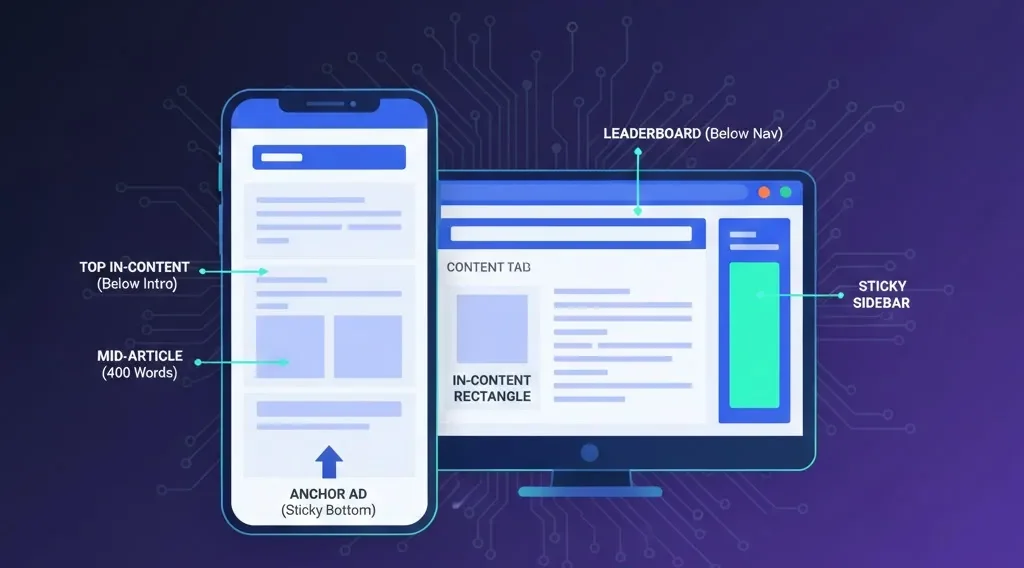
Placement #1 – Top In-Content (Below Title/Intro)
This is the most valuable real estate on your site.
-
Position: Directly after the H1 title or after the first two paragraphs.
-
Why it works: Users are most engaged when they first land. This ad usually has a 70-90% viewability rate.
Placement #2 – Middle of Article (Every 400–600 Words)
For long-form pillar posts (like our 2000-word guides), a single ad isn’t enough.
-
Strategy: Insert responsive units every 400–600 words.
-
Pro Tip: Place these ads right after a “Value Hook” or a sub-heading (H2) where users naturally pause.
Placement #3 – Anchor Ad at Bottom (Mobile Only)
This ad sticks to the bottom of the screen as the user scrolls.
-
Benefit: It is always visible, leading to a very high Click-Through Rate (CTR).
-
Warning: Ensure it is easy to close (X button) to stay compliant with AdSense policies.
Example Mobile Layout From Prodigy AI Tools
When we audited Prodigy AI Tools, we noticed that removing the ad above the H1 and moving it below the first paragraph increased our RPM by 18%. Why? Because users felt the content was more accessible, stayed longer, and eventually clicked the ads further down.
Best Desktop Ad Placements
Desktop users behave differently. They have more screen real estate, allowing for wider and more creative placements.
Placement #4 – Below Navigation / Under Title
A 728×90 (Leaderboard) or 970×90 (Large Leaderboard) under the main menu works wonders for desktop users who land from Google. It frames the content without blocking it.
Placement #5 – In-Content Rectangles
The 336×280 (Large Rectangle) is a classic for a reason. Placing this within the body of your text—preferably aligned to the left or center—integrates it into the reading flow.
Placement #6 – Sticky Sidebar (Desktop Only)
A 300×600 “Half Page” ad in the sidebar that stays in view as the user scrolls is an RPM powerhouse.
-
When to use: Only on desktop.
-
Constraint: Ensure your sidebar doesn’t overlap with the main content on smaller laptop screens.

Auto Ads vs Manual Placements in 2026
Google’s AI has gotten smarter, but should you trust it completely?
Pros & Cons of Auto Ads
-
Pros: It uses machine learning to test placements you might never think of. It saves hours of manual coding.
-
Cons: It can sometimes place ads in “weird” spots, like in the middle of a contact form or overlapping a menu.
Hybrid Strategy: The Prodigy Method
We recommend the Hybrid Strategy:
-
Manual Placements: Fixed ads for your “Golden Zones” (Top in-content, Mid-content).
-
Auto Ads: Turn them ON, but set the “Ad Load” slider to low or medium. This allows Google to fill the gaps without overwhelming the page.
Ad Sizes & Formats That Perform Best in 2026
Top-Performing Sizes
-
300×250 / 336×280: The “Bread and Butter” for in-content.
-
728×90: Best for headers.
-
300×600: Best for sidebars.
-
320×100: The “Large Mobile Banner”—great for mobile headers.
What to Avoid: “Vignette Spam”
Vignette ads (full-screen ads between page loads) are high-earning but high-risk. If a user sees a vignette every time they click a link on your site, they will leave.
Prodigy Rule: Set a frequency cap on Vignettes so they only appear once every 10-20 minutes per user.
How Ad Placement Impacts RPM, CTR, and Session Value
Understanding Session RPM
Most bloggers focus on Page RPM, but Session RPM is the true metric of success.
-
Page RPM: How much you earn per 1,000 views on one page.
- Session RPM: How much you earn from a user’s entire visit (even if they visit 5 pages).If your ads are too aggressive, Page RPM goes up, but Session RPM goes down because users leave before visiting a second page.
Example Data From Prodigy AI Tools
| Layout Type | Viewability | CTR | Page RPM |
| Old (Cluttered) | 42% | 0.8% | $3.50 |
| New (Prodigy Optimized) | 68% | 1.4% | $6.20 |

Mistakes to Avoid With AdSense Placements
1. Accidental Click Zones
Placing ads too close to a “Download” button or a “Next” link. Google considers this Invalid Traffic, and it can lead to an account ban. Always keep 20-30 pixels of padding between ads and clickable elements.
2. Overloading the Fold
In 2026, having more than one ad visible on the screen at the same time is considered “Ad Heavy.” It slows down the site and triggers Google’s “Low Value Content” filters.
7-Day A/B Testing Plan for Beginners
Don’t guess; test!
-
Day 1–2: Record your current metrics (RPM, CTR) from the AdSense dashboard.
-
Day 3–4: Change ONE thing. For example, move your middle ad 200 words higher.
-
Day 5–7: Compare. Did the RPM go up? Did the Bounce Rate stay the same? If yes, keep the change.
Recommended Layout Templates for Bloggers
Template 1 – Long-Form Pillar (2000+ Words)
-
Ad 1: After Intro (Manual)
-
Ad 2: After 3rd H2 (Manual)
-
Ad 3: Middle of post (Auto Ad slot)
-
Ad 4: Before Conclusion (Manual)
-
Anchor: Mobile Bottom (Auto Ad)
Template 2 – Short News Update (<600 Words)
-
Ad 1: Below Title
-
Ad 2: Bottom of post
-
Keep it light to prevent UX issues.
FAQs – Ad Placements & Policies
Q: Can I place ads inside tables or lists?
A: No. AdSense policies forbid placing ads in a way that mimics content structure. Keep them between paragraphs.
Q: Are sticky ads allowed on mobile?
A: Only if they are the official AdSense “Anchor Ads.” Manual sticky ads on mobile often violate policy.
Q: Do I need different layouts for US vs India traffic?
A: Yes. Tier-1 (US/UK) traffic often has better internet speeds; you can afford slightly larger ad units. For Tier-3 traffic, stick to lightweight responsive units.

Conclusion
Maximizing AdSense RPM in 2026 is about intelligence, not volume. By focusing on viewability, using the “Prodigy Hybrid Method,” and strictly following UX guidelines, you can double your revenue without gaining a single new visitor.
Start by fixing your Top In-Content placement today. It is the fastest way to see an immediate jump in your earnings.


This is a really helpful post, thanks for sharing these insights into AdSense placement! I’m definitely going to be looking into how Prodigy AI Tools can help optimize this.