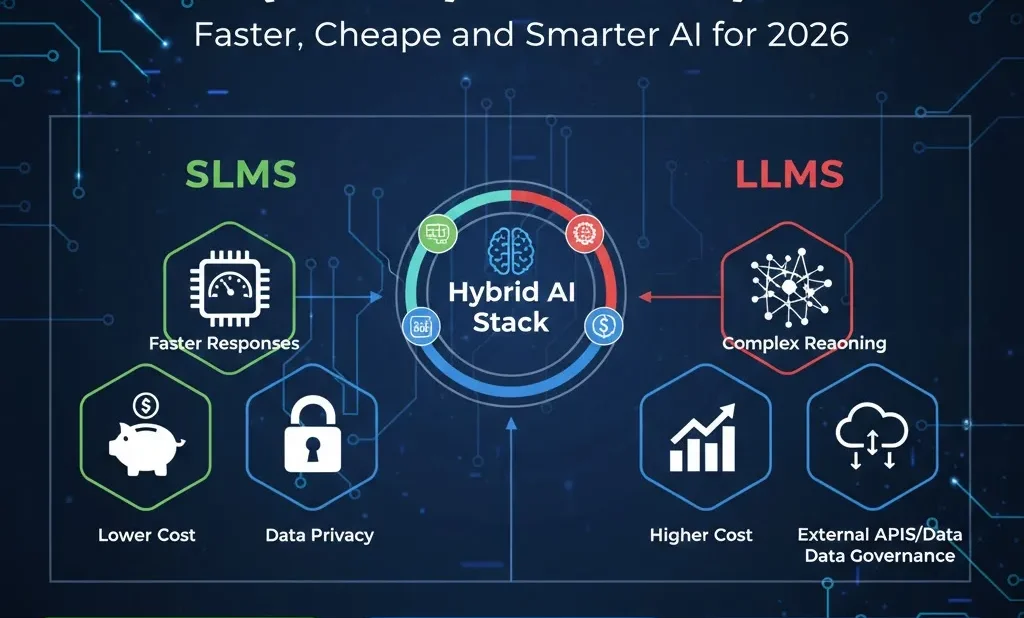
SLMs vs LLMs: Why Small Language Models Are Becoming So Important
When we first started building AI features at Prodigy AI Tools, we did what almost everyone else did: we used large Large Language Models (LLMs) for everything. They were powerful, but in real projects, we quickly hit three big problems:
-
Responses were sometimes too slow
-
The GPU and API bills kept growing
-
Some clients were not happy sending their data to external LLM APIs
Because of this, we started testing Small Language Models (SLMs) in real deployments. That’s when we realized: You don’t always need a huge model. For many tasks, a well‑trained SLM is faster, cheaper, and safer.
In this blog, based on our own work and experiments, you’ll learn:
-
What SLMs actually are
-
The real differences between SLMs and LLMs
-
Why SLMs matter so much for companies and edge devices
-
Five real‑world use cases we’ve seen work in 2025–2026
-
The hard parts of fine‑tuning SLMs and keeping them running well
-
Why Our Experience Matters
At Prodigy AI Tools, we are not just writing theory. Our small team works as:
-
AI architects and MLOps engineers
-
Deploying LLM + SLM systems for real clients
-
Running tests on cloud GPUs, CPU servers, and edge devices
-
Tracking latency, throughput, and cost per 1,000 tokens for different setups
So the points below are based on hands‑on projects, not just reading papers.
What Is a Small Language Model (SLM)?
A Small Language Model (SLM) is still a language model, but it is:
-
Much smaller than the typical LLM
-
Focused on one or a few tasks, not everything
-
Designed so it can run on normal hardware or edge devices, not only on giant GPU servers
1. Size
Roughly:
-
An SLM usually has around 0.5 to 7 billion parameters
-
A typical LLM may have 30 to 175+ billion parameters
Smaller size means:
-
Less memory needed
-
Faster computation
-
Lower cost per request
2. Focus
SLMs are usually specialized. They might be trained or fine‑tuned for:
-
One company’s customer support
-
A specific factory’s procedures
-
One programming language’s code completion
-
One product’s manuals and error codes
LLMs, on the other hand, are general models. They know a bit about many topics and can handle open‑ended chat.
3. Where They Run
In our projects, we use a simple rule:
If a model can run well on a normal server or edge device and still meet the app’s speed requirements, we treat it as an SLM.
That means an SLM can often:
-
Run on CPU‑only servers
-
Fit into 8–16 GB of GPU memory
-
Run on industrial PCs, gateways, or other edge boxes
SLMs vs LLMs: Simple Comparison
Below is a practical comparison based on what we’ve seen in production tests and client deployments.
SLM vs LLM – At a Glance
| Item | SLM (1–7B params) | LLM (30–175B+ params) |
|---|---|---|
| Parameter count | ~0.5–7B | 30–175B+ |
| Model size (quantized) | ~1–15 GB on disk | 40–350+ GB |
| Hardware needs | Normal CPU or single mid‑range GPU; can run on edge | Multi‑GPU, high‑end servers; cloud‑first |
| Typical latency (short reply) | ~30–200 ms when self‑hosted | ~400 ms–3+ seconds via APIs |
| Cost per 1K tokens | Often 3–10× cheaper | Higher (GPU cost + API pricing) |
| Best for | Narrow tasks, edge AI, policy checks, local assistants | Complex reasoning, broad chat, orchestration |
| Data privacy | Easy to keep fully inside your VPC or on‑prem | Often, external vendor APIs, more governance work |
In simple words:
-
Use an LLM when you really need deep, flexible reasoning.
-
Use an SLM when you need speed, lower cost, and strong data control.
Why SLMs Matter for Enterprises and Edge AI
In almost every serious project, three things matter:
-
Speed (users won’t wait forever)
-
Cost (AI must be profitable)
-
Compliance and privacy (especially in regulated industries)
SLMs often give a better balance on all three.
1. Faster Responses for Real‑Time Apps
In one SaaS product we helped with, a support chatbot used only a cloud LLM:
-
Responses often took 1–2 seconds
-
At busy times, delays got worse
-
Users saw “typing…” animations and started to lose patience
We then moved most questions to a 3B‑parameter SLM running on the client’s own server:
-
Average response time dropped to under 200 ms
-
No network jitter
-
The experience felt instant and smooth
For customer chat, in‑app help, or device UIs, this kind of speed difference is huge.
2. Lower Cost and Energy Usage
In another project, a client said:
“We want AI everywhere in our product, but we also need to protect our margins.”
We redesigned their system:
-
Simple, repeated tasks → SLMs
-
Complex tasks → LLM only when needed
The result:
-
LLM calls dropped by about 60%
-
Total inference cost went down by about 35–40%, with almost no visible drop in quality.
Because SLMs do fewer computations, they use less power and cheaper hardware.
3. Better Data Privacy and Compliance
Some clients, especially in Europe or regulated sectors, simply cannot send raw logs, emails, or documents to a third‑party LLM API.
In those cases, we:
-
Deployed SLMs inside their own cloud VPC or even on‑prem
-
Kept all logs and prompts inside their systems
-
Used external LLMs only on anonymized, summarized data if needed
This made their legal and security teams much more comfortable, while still getting AI benefits.
5 Real‑World SLM Use Cases We’ve Seen
Here are five patterns we’ve used or seen work well in 2025–2026.
1. On‑Device or Local Customer Support
A hardware and IoT company wanted a built‑in assistant for their devices. Users should:
-
Get help even when the internet is slow or down
-
Avoid sending sensitive config data to external servers
We:
-
Deployed a 2–3B SLM on the local gateway
-
Trained/fine‑tuned it on manuals, error codes, and FAQs
Benefits:
-
Users get instant help (no network dependency)
-
Many common support tickets disappeared
-
Logs stayed local, which improved privacy
2. Retail Inventory and Store Operations
A retail chain asked for a system where store managers could simply type questions like:
-
“Which products are low stock but high margin in this store?”
-
“Which items had the most returns last week?”
We:
-
Connected a store‑level SLM to their POS and inventory data
-
Let staff query in plain language
Because the questions were narrow and structured, SLMs worked very well:
-
Fast answers during busy hours
-
No need to send store data to a generic cloud LLM
-
Store teams made better decisions on the floor
3. Manufacturing Defect Assistant
In a smart factory, there were already anomaly‑detection models. But operators still struggled to understand what to do when alarms fired.
We added a 3B SLM that:
-
Summarized the relevant logs in simple language
-
Compared with past incidents
-
Suggested likely causes and step‑by‑step actions based on the SOP manual
Over the first two months, we saw Mean Time to Resolution (MTTR) drop by about 40%, and newer operators became much more effective.
4. Private Productivity Assistants for Each Company
One SaaS product we work with sells internal AI assistants to enterprises. Many customers were nervous about:
-
Sending internal emails and documents to a public LLM
Our solution:
-
Deploy a separate SLM instance inside each customer’s own VPC
-
Fine‑tune it on that customer’s documents, wiki, and tone of voice
The SLM handled:
-
Email and thread summaries
-
Drafting weekly reports
-
Finding the most relevant internal document for a question
This boosted usage and solved many privacy objections at the same time.
5. Policy and Safety “Gatekeeper” Models
Several enterprises wanted to use strong external LLMs but with strict safety and policy control.
We built small policy SLMs that:
-
Sit inside the API gateway
-
Pre‑check user prompts (remove sensitive info, block forbidden topics)
-
Post‑check LLM responses for toxicity, IP problems, or rule violations
-
Return a structured decision: allow, redact, or block
Because these SLMs are small, they can run at very high throughput with low cost, and they give a clear safety layer in front of the LLM.
The Hard Part: Fine‑Tuning and Running SLMs
It’s important to understand: SLMs are not “magic easy mode.”
They are smaller, but that can make them more sensitive to data quality and fine‑tuning choices.
1. Data Quality Matters Even More
In one of our early tests, we fine‑tuned a 1B SLM on a large but messy text corpus. The output was average at best.
Only after we:
-
Collected domain‑specific FAQs
-
Added real tickets and logs
-
Wrote negative examples (what not to say)
Did the model start to feel really useful?
With SLMs, you win more by good, well‑chosen data than by just adding more data.
2. Picking the Right Fine‑Tuning Method
In practice, we often use:
-
LoRA / adapter fine‑tuning instead of full fine‑tuning, because:
-
It uses less computing
-
It’s easier to manage many customer‑specific versions
-
For edge deployments, we combine this with:
-
Quantization (e.g., 8‑bit, 4‑bit) to fit into smaller hardware
-
Careful testing after each step, so quality doesn’t collapse
3. MLOps Becomes a “Many Models” Problem
With SLMs, you may end up with:
-
10–50 small models for different tasks, regions, or customers
-
Each needs versioning, rollout plans, and monitoring
So you must handle:
-
A model registry
-
Canary releases and fast rollbacks
-
Dashboards for latency, errors, and quality metrics
It’s not less work than one big model—just a different style of work.
Our View: The Future Is Hybrid
From our projects at Prodigy AI Tools, the pattern is now very clear:
-
Using only LLMs leads to higher cost, more privacy worries, and sometimes slower apps
-
Using only SLMs may not be enough for rich, complex reasoning
The best systems are hybrid:
-
Use LLMs for planning, complex reasoning, and wide‑open tasks
-
Use SLMs for focused work: edge AI, policy checks, customer‑specific assistants, and any place where latency, cost, and data control matter most
At Prodigy AI Tools, our promise is simple:
We will keep sharing practical guides, patterns, and benchmarks that we have tested in our own systems and client projects, so you don’t have to guess.
If you are a CTO, AI developer, or tech founder, a good next step is:
-
List your AI use cases.
-
Score each one on four axes: latency, privacy, specialization, and cost per request.
-
Wherever the constraints are tight, seriously consider a Small Language Model.
-
Wherever you need rich, open‑ended intelligence, design a hybrid LLM + SLM workflow.
Choosing the right model size for the right job will be one of the main secrets behind the most successful AI products in the coming years.


Das ist wirklich ein interessanter Artikel! Ich finde es spannend, wie SLMs in Zukunft eine größere Rolle spielen könnten.